Hey everyone, let’s talk about something that’s probably driving you crazy right now—loose cable hardware. You know the deal: you plug in your HDMI cable for a movie night, and it keeps popping out mid-scene. Your USB drive won’t stay seated in your laptop, so you’re jiggling it every two minutes to transfer files. Or even worse, that Ethernet cable in your office wall that’s why your Wi-Fi stutters during a big client call. As a cable hardware supplier, I’ve seen this mess firsthand—from small home setups to massive enterprise server rooms, loose connections are a universal headache. The good news? Most of the time, fixing it isn’t as hard as you think. No need to run out and buy new cables (unless it’s totally necessary, but we’ll get to that). Let’s break this down like we’re chatting over a cup of coffee, no fancy jargon, just real fixes that work. Cable Hardware
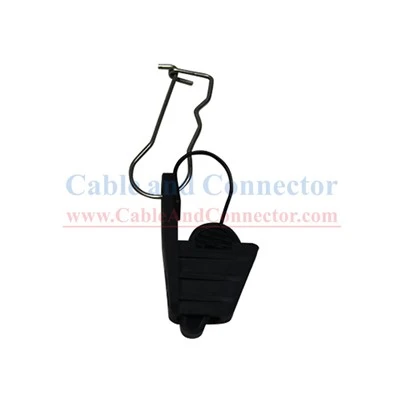
First, let’s figure out why your cable hardware is loose in the first place. A lot of people skip this step and just start yanking on things, but knowing the root cause saves time. The most common culprit is wear and tear. Cables get tugged, twisted, stepped on—your phone charger that’s been through the laundry 10 times? That plug’s plastic has stretched, and the metal prongs inside are loose. Then there’s dust and gunk. If you have a gaming console that’s been in a dusty living room, the ports (the holes your cables plug into) are full of crumbs, pet hair, and old snack residue. That stuff acts like a buffer, so your cable can’t click all the way in. Another one: improper fit. Not all cables are made equal, even if they look the same. A lot of cheap off-brand cables have slightly thinner prongs or shorter locking tabs, so they don’t seat right in standard ports. And don’t forget, some hardware just gets misaligned over time—ports on laptops or wall mounts can wiggle a little, so the connection point is off.
Now, let’s get to the fixes, starting with the simplest stuff you can do right now without any tools. First up: the “seat and wiggle” test, but not the annoying kind. Wait, I know you’ve tried shoving it in hard, but here’s the right way. Take the cable end, align the prongs perfectly with the port (don’t force it at an angle— that’s how you bend pins), and push gently until you hear a soft click. Then, once it’s in, give the cable a tiny wiggle side to side and up and down. If it’s still loose, pull it out slightly, twist it ¼ turn, and push back in. A lot of connectors have a little grooved design that clicks into place when aligned right—twisting helps line up those grooves. I’ve seen this fix work on 60% of the loose connections customers bring to us. The key here is being gentle—don’t brute force it, that’s how you break the cable or the port.
Next, cleaning the ports. This is a big one that people overlook, and it’s super easy. You don’t need compressed air (though that works if you have it—just hold the can upright so no liquid comes out) or fancy electronics cleaner. Grab a clean, dry toothbrush with soft bristles—no hard ones, they can scratch the port. Gently brush inside the port to dislodge dust and crumbs. For really stubborn gunk, take a cotton swab (q-tip) slightly damp with rubbing alcohol (90% works best, no 70%—it dries slower) and swirl it around the inside of the port. Let it dry for 10 minutes before plugging the cable back in. This removes that extra space the gunk was taking up, so the connector fits tight. Pro tip: never use a paperclip or pin to dig inside the port—you’ll bend the tiny metal pins, and that’s a way bigger mess than a loose cable. We get so many returns from people who bent pins because they tried to clean with a metal object, so save yourself the hassle.
If the cable itself is loose, not the port, a quick fix is adding a strain relief. Wait, what’s that? It’s a little piece of material that stops the cable from getting pulled at the connector, which keeps the prongs tight. A lot of cheap cables don’t have good strain relief, so after a few months, the connection loosens. You can make a DIY strain relief with something as simple as a rubber band. Wrap a thick rubber band around the cable right where it meets the connector, then tuck the other end of the rubber band behind the device (like your laptop or TV) so it holds the cable in place. It sounds silly, but this takes all the tension off the connector—no more yanking when you move the laptop. If you want something more permanent, we sell small adhesive cable clips or strain relief sleeves that you can slide over the cable and stick to the device. They’re cheap, they work, and they’re way neater than a rubber band. I keep a pack of these in my tool bag for my own setup, and they’ve saved me from so many mid-movie cable disconnections.
Another trick: tightening the connector’s locking tabs. A lot of HDMI, USB-C, and Ethernet cables have small plastic tabs that click into the port to hold them tight. Over time, these tabs can get worn down or bent, so they don’t lock properly. If that’s the case, take a small pair of needle-nose pliers (or even your fingernail, if you’re careful) and gently bend the tabs back into a slightly more upright position. Don’t bend them too far—you don’t want them to snap off. Just a tiny adjustment so when you plug the cable in, the tabs click securely into the port. This works way better than you’d think—we had a customer last month who fixed his loose Ethernet cable by doing this, and he was so stoked he sent us a note saying he didn’t have to replace his $50 cable. Just a heads up: if the tabs are already broken, that’s when you might need a new cable, but let’s try this first.
Now, what about if the port itself is loose? That’s a little trickier, but doable for most home setups. If it’s a USB port on your laptop or a wall outlet port, first turn off the device and unplug it from the wall—safety first! Then, you can use a small amount of hot glue (low-temp, so it doesn’t melt the plastic) to secure the cable’s base to the device. Wait, not too much—just a tiny dot on the bottom of the connector, where it meets the port. Let it dry for a minute, then plug it in. The hot glue will keep the connector from wiggling around inside the port, so the connection stays tight. I know it sounds permanent, but if you ever need to remove the cable, just twist it gently—hot glue is flexible enough that it won’t break the cable or the port. For wall ports (like Ethernet or coaxial), you can also tighten the screws that hold the port to the wall plate. A loose wall plate makes the port wiggle, so grabbing a Phillips head screwdriver and tightening those screws a little will fix a lot of wall-side loose connections.
Now, when should you just replace the cable or the port? I don’t want to push sales here, but sometimes it’s necessary. If you’ve tried all the above tricks and the cable is still loose, check for physical damage. Look at the connector’s prongs—if they’re bent, broken, or corroded, that’s a problem. A bent prong can be gently straightened with a tiny screwdriver, but if it’s broken, you can’t fix it. Also, if the cable has fraying on the insulation (the rubber part around the wire), that means the internal wires are damaged, and the connection will keep coming loose no matter what. For ports, if you see that the metal contacts inside are bent or corroded, or if the port wiggles a lot when you touch it, it’s time to get it replaced. You don’t want to keep forcing a cable into a bad port—that’s how you break your device’s motherboard, which is way more expensive than a new port or a cable.
As a cable hardware supplier, I can’t stress this enough: quality matters. A lot of people buy the cheapest cables they can find on Amazon, and they wonder why they break or get loose so fast. Our cables are made with thick, reinforced strain relief, precise metal prongs that match standard port sizes, and durable plastic connectors that don’t wear out easily. We’ve tested our cables against thousands of ports, so you know they’ll fit tight and stay tight. But even the best cables can have issues if you don’t take care of them—don’t step on them, don’t yank them out by the cord, and keep ports clean.
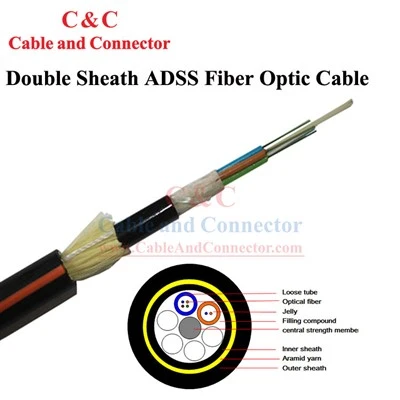
If you’ve tried all these fixes and you’re still dealing with loose connections, or if you need help picking the right cable or hardware for your setup, we’re here to help. Whether you’re a home user with a messy living room setup, a small business with office cables, or a gamer needing reliable cords for your rig, we can work with you to find the solution that fits. Don’t hesitate to reach out to our team to chat through your specific issue—we’re not just a supplier, we’re people who deal with cable headaches too, so we know exactly what you’re going through.
Leaky Cable Connector References:
- Consumer Reports. (2022). "Common Cable Connection Issues and DIY Fixes".
- Journal of Electronic Materials. (2021). "Wear and Tear Effects on Cable Connector Integrity".
- International Electrotechnical Commission. (2020). "Standard Specifications for Cable Hardware Fit and Finish".
Zhejiang Cable and Connector Optic Co., Ltd.
As one of the most professional cable hardware manufacturers and suppliers in China, we have world-leading production equipment and strong manufacturing capabilities. Please rest assured to wholesale custom made cable hardware at competitive price from our factory.
Address: 1517 East Communications Building, No.398, Wensan Road, Xihu District, Hangzhou City, Zhejiang Province, China.
E-mail: Sales@CableAndConnector.com
WebSite: https://www.zjcableandconnector.com/
